Light sensors come in different colors. Getting these connections wrong can prevent a controller from controlling a light properly. It can also create safety risks during installation.
The good news is that most wire colors follow common functions. Usually:
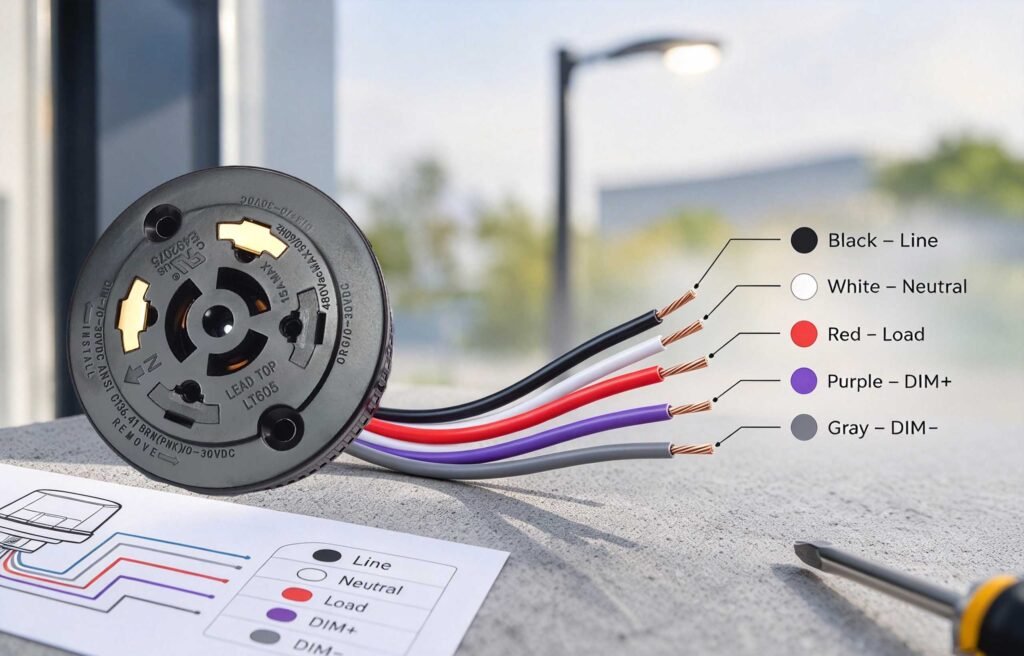
- Black is the line
- White is neutral
- Red is the switched load
- Purple and gray may handle limited voltage dimming signals
However, these colors are not universal. This article will be your complete guide to understanding photocell switch wire colors.
What Are the Common Wire Colors on a Photocell Receptacle?
A typical photocell lighting sensor receptacle uses three main connections.
- Black is usually Line
- White is Neutral
- Red is the switched Load
These wires form the basic power path between the photocontrol and the lighting fixture. ANSI receptacles retain these three power functions while adding separate signal contacts for dimming controls.
Black Wire
This typically carries incoming AC line power. It connects the receptacle to the supply line. This allows the outdoor photocell light sensor to receive power for its control circuit.
White Wire
The white wire is typically the common or neutral connection. It completes the AC circuit for the photocontrol and luminaire.
Red Wire
This is for the switched load. The connection is used to control power to the lighting fixture.
What Do Purple and Gray Wires Mean on a Lighting Control?
They usually appear when a photocell receptacle includes dimming contacts. In ANSI C136.41 applications, violet is commonly used for the positive 0–10V dimming signal, while gray is commonly used for the negative signal.
However, wire-color conventions have changed in some applications, so the product diagram should always be checked. NEMA notes that pink may be used for the negative 0–10V conductor where gray is reserved.
What Does the Purple/Violet Wire Do?
The violet wire commonly carries the DIM+ signal. It connects the photocell control interface to the driver’s positive dimming input.
What Does the Gray/Pink Wire Do?
The gray or pink wire commonly carries DIM−. It provides the negative side of the 0–10V control circuit.
What About Brown and Orange Wires?
Brown and orange can provide optional signal contacts. They may support additional dimming and control functions. Their exact purpose varies by lighting system.
| Wire Color | Common Function | Typical Application |
| Black | Line/Live | AC power |
| White | Neutral | AC power |
| Red | Load | Lighting output |
| Purple/Violet | Dimming + | 0–10V |
| Gray/Pink | Dimming − | 0–10V |
| Brown | Signal/Data or +24V | DALI, control, Zhaga |
| Orange | Additional signal | DALI/control |
| Blue | General I/O | Zhaga/control |
How Do 3-Wire, 5-Wire, and 7-Wire Photocontrol Receptacles Differ?
3-wire setup
This handles basic switching and normally uses:
- Black — Line
- White — Neutral
- Red — Load
This setup suits basic switching. The photocell controls when power reaches the lighting fixture.
5-wire
This version adds two low-voltage DIM+ and DIM− dimming connections. These are applicable mostly for 0–10V dimming. This not only automates switching but also light intensity.
7-wire
This version provides more signal connections. Depending on the design, these may support:
- Dimming
- Monitoring
- DALI
- Other control functions
The exact assignment depends on the product diagram.
How Does Zhaga Book 18 Wiring Differ From Conventional Photocell Wiring?

This module uses a different interface concept from conventional mains-powered photocontrols.
The interface uses less power and supports communication connections rather than the traditional arrangement. Zhaga describes Book 18 as a smart interface for outdoor luminaires and sensing or communication nodes. Its recommended electrical interface includes:
- A 4-pin connector
- Supporting 24V DC power
- DALI communication
- A logic signal input
This creates an important wiring rule: do not transfer NEMA wire-color assumptions to a Zhaga connector. Pin functions and wire colors are product-specific. Always follow the exact connector diagram before installation.
| Pin | Wire Color | Function |
| Pin 1 | Brown | 24VDC |
| Pin 2 | Gray | DALI− |
| Pin 3 | Violet | DALI+ |
| Pin 4 | Blue | General I/O |
How Do You Wire a 3-Wire Light Sensor?
Start by switching off the circuit breaker. Then verify that no power is present. Intermatic gives the same safety instruction before inspecting and correcting photocontrol wiring.
For a typical three-wire setup, connect:
| Wire | Typical Connection | Purpose |
| Black | Line / Hot | The black wire receives the incoming line power. |
| White | Neutral | The white wire provides the neutral path. |
| Red | Lighting Load | The red wire carries the switched output to the load. |
After wiring, check every connection before restoring power.
What Are Common Photocell Wiring Mistakes?
Photoelectric sensor wiring problems are often simple mistakes. A reversed Line and Load connection is one example. Intermatic notes that this can cause lights to cycle during daylight.
Watch for these issues:
- Mixing up Line and Load
Wiring should be as per the wiring diagram.
- Trusting color alone
Colors are only useful clues. They are not universal rules.
- Misusing signal wires
Dimming contacts are different from power connections.
- Ignoring the driver
Compatibility is critical. Photocell and driver should support the same control method.
- Leaving loose connections
Poor contact can cause unreliable operation.
- Skipping the neutral check
NEMA guidance identifies a lost or loose neutral as a common photocontrol wiring problem.
When something looks unclear, stop. Check the product diagram before connecting anything.
Why Is Correct Photocell Wire Identification Important?

Yes! It is. Because it ensures that the lighting control operates the way it is meant to. A wrong connection can cause operating problems. Intermatic specifically notes that reversed Line and Load connections can cause daytime cycling.
Proper identification also protects small control circuits. This matters in receptacles that include dimming or communication contacts. ANSI C136.41 covers external photocontrols with added light-level control functions.
Correct identification can help you:
- Fewer wiring errors.
- Simple troubleshooting.
- Protect control connections.
- Improve maintenance work.
- Confirm photocell and driver compatibility.
How To Confirm the Correct Photocell Wire Connections?
Look for the product model and see its wiring diagram. This matters because wire assignments can differ by product and control system.
ANSI C136.41 is a related standard. It covers receptacles with both power and dimming contacts. Before making a connection, check:
● Line
Confirm the incoming power connection.
● Neutral
Verify the neutral connection.
● Load
Identify the switched output.
● Signal wires
Check any dimming or control terminals.
● Voltage
Match the photocell with the circuit rating.
Every connection must be secure. Intermatic recommends following the instructions for the specific photocontrol model.
FAQs
What color is the line wire on a photocell?
Black is typically used for the Line or Live connection on a 3-wire photocell receptacle.
What color is the load wire on a photocell?
Red is typically used for the switched Load connection to the lighting fixture and driver.
What color is the neutral wire?
White is commonly used for the Neutral connection in a standard 3-wire photocell receptacle.
What do purple and gray wires mean on a photocell?
Purple or violet commonly carries the 0–10V DIM+ signal, while gray or pink commonly carries DIM−.
Are photocell wire colors universal?
No. Wire colors can vary depending on various factors. Always check the product wiring diagram.
What can a 7-wire photocell receptacle support?
This can support:
- Additional dimming
- Monitoring
- Communication
- Control functions
How is Zhaga Book 18 wiring different?
This uses a dedicated low-voltage interface for outdoor sensing and communication modules. So its wire assignments should not be assumed from conventional photocell wiring.
Can I identify photocell wires by color alone?
No. It’s not advised. Colors are for reference only. Confirm every connection using the wiring diagram for the exact photocell model.
The Bottom Line
Correct wire identification makes photocell installation safer and more reliable. For dependable photocontrol solutions, Lead-Top offers reliable products for different outdoor lighting applications. Its range can help lighting contractors and project buyers find the right photocontroller for their needs.


 English
 Portuguese (Brazil)
 Spanish
 Russian
 Dutch
Dutch Japanese
 Portuguese (Portugal)